Getting Started
POSGGym is a library that provides an API for multi-agent, partially observable environments represented as a Partially Observable Stochastic Game (POSG). The thing that distinguishes POSGGym from Gymnasium and PettingZoo libraries is full support for environment models which can be used for planning.
The main API of POSGGym is adopted from the Gymnasium and PettingZoo libraries so should be fairly familiar if you have used either of those libraries before.
Initializing Environments
Initializing environments is very easy in POSGGym and can be done via the make function (identical to Gymnasium):
import posggym
env = posggym.make('PursuitEvasion-v1')
This will return an Env for users to interact with. To see all environments you can create, use posggym.pprint_registry() or see under Environment section of this documentation.
Most environments included in POSGGym can be initialized with different parameters. You can initialize environments with custom parameters either by passing them as keyword arguments to make, or alternatively by loading the environment class directly (similar to PettingZoo). To see the list of available parameters for a given environment check out it’s documentation in the Environments section (e.g. PursuitEvasion) .
As an example, we can initialize the PursuitEvasion-v1 environment using the smaller 8x8 grid, instead of the default 16x16 grid, and reduce the max episode steps to 50, by using the following:
import posggym
env = posggym.make('PursuitEvasion-v1', grid="8x8", max_episode_steps=50)
Similarly, how the environment will be visualized can be specified using the render_mode keyword argument. See the description of the Env.render() method for details on the default meaning of different render modes.
import posggym
env = posggym.make('PursuitEvasion-v1', render_mode="human")
Interacting with the Environment
POSGGym models the environment as a POSG where all agents act simultaneously. Each step all agents perform their action then receive their observation and rewards. This is the classic “agent-environment” loop, but differs from multi-agent games like poker or chess where only a single agent may act each step.
The loop is implemented in posggym using the following code:
import posggym
env = posggym.make("PursuitEvasion-v1", render_mode="human")
observations, infos = env.reset()

for _ in range(300):
    actions = {i: env.action_spaces[i].sample() for i in env.agents}
    observations, rewards, terminations, truncations, all_done, infos = env.step(actions)
    env.render()

    if all_done:
        observations, infos = env.reset()

env.close()
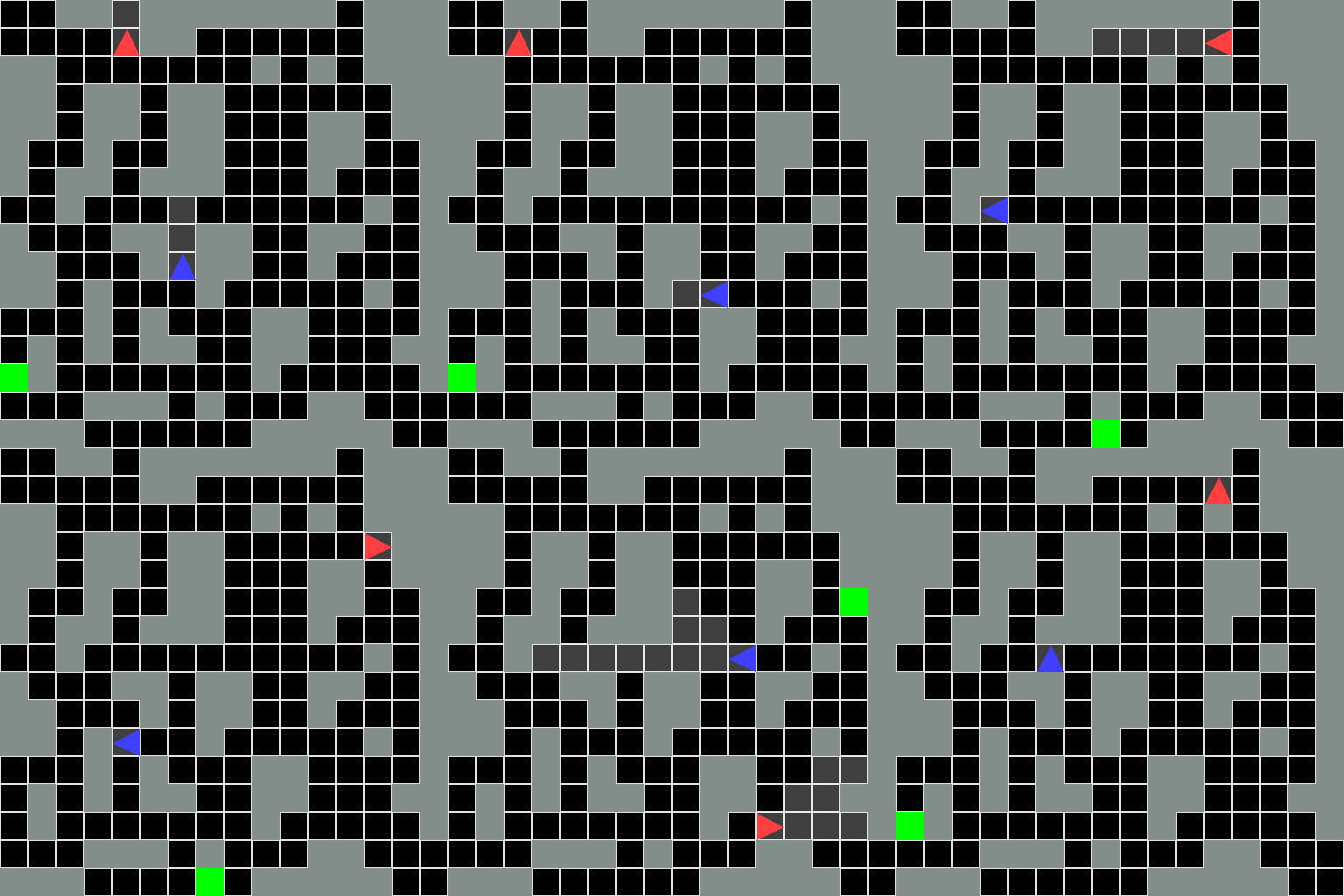
The output should look something like this:
Explaining the code
First, an environment is created using make with an additional keyword "render_mode" that specifies how the environment should be visualised. See `Env.render() for details on the default meaning of different render modes. In this example, we use the "PursuitEvasion" environment involving two agents: a evader and a pursuer. The evader (red triangle) is trying to reach the goal location (green square) without being spotted by the pursuer (blue triangle), while the pursuer is trying to spot the evader before they escape.
After initializing the environment, we reset the environment to get the first observation for each agent. Note, this is a dictionary where the keys are the ID of each agent, and the values are the observation for each agent. For initializing the environment with a particular random seed or options (see specific environment documentation for possible values) use the seed or options parameters with reset method.
Next, agents performs their actions in the environment, step, this can be imagined as multiple robots moving or players pressing a button on a games’ controller that causes a change within the environment. As a result, each agent receives a new observation from the updated environment along with their reward for taking the action. Both of these are again returned as dictionaries mapping from agent ID to the agents observation or reward. The reward for each agent could be for instance positive for destroying an enemy or a negative reward for moving into lava. One such action-observation exchange is referred to as a timestep.
After some timesteps the environment may end, this is called the terminal state. For instance, in the PursuitEvasion environment the evader may have reached it’s goal or be spotted by the pursuer. POSGGym follows the gymnasium API with regards to terminal state; if the environment has terminated, this is returned by step. Similarly, we may also want the environment to end after a fixed number of timesteps, in this case, the environment issues a truncated signal. Note however that in POSGGym there are multiple agents and it’s possible that agents reach terminal states at different times, thus the whether an agent has reached a terminated or truncated state are returned as dictionaries, again mapping from agent ID to their terminated or truncated value. In addition to terminated and truncated signals for each agent, POSGGym also returns an all_done signal which is true if all agents have reached either a terminated or truncated state. If all_done is true, then reset should be called next to restart the environment.
NOTE:
all_doneis very much a convenience signal, it is possible to determine if an episode is completed usingterminatedsandtruncatedsreturned by thestepfunction, but for environments where the number of agents can change over time this requires some additional work by the user. Theall_doneis one of the main differences between Gymnasium/PettingZoo and POSGGym.
Agents
Each environment in POSGGym contains multiple-agents acting in a single environment where each agent is identified using a unique string ID. The IDs of all possible agents that can interact with the environment can be accessed using the env.possible_agents property. Note that depending on the environment not all agents may be active in the environment at one time, or in the same episode. To see the list of currently active agents in the environment use env.agents.
Action and observation spaces
Every environment specifies the format of valid actions and observations for each agent with the env.action_spaces and env.observation_spaces attributes. These attributes map from agent ID to their action or observation spaces. This is helpful for knowing both the expected input and output of the environment for each agent as all valid actions and observation should be contained with the respective space.
In the example, we sampled random actions via env.action_space[i].sample(). In practice actions will be selected using an agent policy, mapping observations to actions.
Every environment should have the attributes action_spaces and observation_spaces, both of which should be dictionaries whose keys are agent IDs and values are instances of a class inherited from gymnasium.spaces.Space. For more information about Space instances, see the Gymnasium Spaces documentation.
Interacting with the Model
A key feature of POSGGym is the inclusion of a dynamics model with each environment. The dynamics model is a POSGModel class and can be accessed using env.model. POSGModel can be used in a similar manner to the Env class, with the key difference being that it is stateless (or purely functional). What this means is that most model functions also take the state of the environment as input and provide outputs conditioned on the input state. This is different to Env which maintains an internal state, accessible using env.state, which is used internally within the reset(), step(), and render() functions.
We can recreate the agent-environment interaction loop using POSGModel as follows:
import posggym

env = posggym.make("PursuitEvasion-v1")
model = env.model

model.seed(seed=42)
state = model.sample_initial_state()
observations = model.sample_initial_obs(state)

for t in range(300):
    actions = {i: env.action_spaces[i].sample() for i in model.get_agents(state)}
    state, observations, rewards, terminated, truncated, all_done, info = model.step(state, actions)

    if all_done:
        state = model.sample_initial_state()
        observations = model.sample_initial_obs(state)
Note this is very similar to the agent-environment interaction loop using the Env class, except for the passing around the state and without support for rendering. Indeed POSGGym includes a DefaultEnv class which is used for most environment implementations and is just a wrapper around a POSGModel class and that handles the state and also adds functionality for rendering the environment.
The advantage of having access to the model is that it can be used for planning, making it easy to use POSGGym environments for both reinforcement learning and planning research, or the intersection of the two (e.g. model-based reinforcement learning algorithms such as AlphaZero).
Modifying the environment using Wrappers
Wrappers are a convenient way to modify an existing environment without having to alter the underlying code directly. Using wrappers will allow you to avoid a lot of boilerplate code and make your environment more modular. Wrappers can also be chained to combine their effects. Most environments that are generated via posggym.make will already be wrapped by default using the TimeLimit, OrderEnforcing and PassiveEnvChecker.
In order to wrap an environment, you must first initialize a base environment. Then you can pass this environment along with (possibly optional) parameters to the wrapper’s constructor:
>>> import posggym
>>> from posggym.wrappers import FlattenObservation
>>> base_env = posggym.make("PursuitEvasion-v1")
>>> base_env.observation_spaces['0']
Tuple(Tuple(Discrete(2), Discrete(2), Discrete(2), Discrete(2), Discrete(2), Discrete(2)), Tuple(Discrete(16), Discrete(16)), Tuple(Discrete(16), Discrete(16)), Tuple(Discrete(16), Discrete(16)))
>>> wrapped_env = FlattenObservation(base_env)
>>> wrapped_env.observation_spaces['0']
Box(0, 1, (108,), int64)
For a full list of implemented wrappers in POSGGym, see wrappers. This includes wrappers for converting a POSGGym environment into PettingZoo and Rllib environments.
If you have a wrapped environment, and you want to get the unwrapped environment underneath all the layers of wrappers (so that you can manually call a function or change some underlying aspect of the environment), you can use the .unwrapped attribute. If the environment is already a base environment, the .unwrapped attribute will just return itself.
>>> wrapped_env
<FlattenObservation<TimeLimit<OrderEnforcing<PassiveEnvChecker<PursuitEvasionEnv<PursuitEvasion-v1>>>>>>
>>> wrapped_env.env
<TimeLimit<OrderEnforcing<PassiveEnvChecker<PursuitEvasionEnv<PursuitEvasion-v1>>>>>
>>> wrapped_env.unwrapped
<posggym.envs.grid_world.pursuit_evasion.PursuitEvasionEnv object at 0x7f4a94086d90>
NOTE: For compatibility reasons calling
wrapped_env.unwrappedin the PettingZoo (posggym.wrappers.petting_zoo.PettingZoo) and Rllib (posggym.wrappers.rllib_multi_agent_env.RllibMultiAgentEnv) wrappers will return pettingzoo and rllib Env classes, rather than the underlyingposggym.Envclass. The underlying env class can be accessed using thewrapped_env.unwrapped.envattribute.